Gathering my day's activity signals for Obsidian with Claude Code
Overview
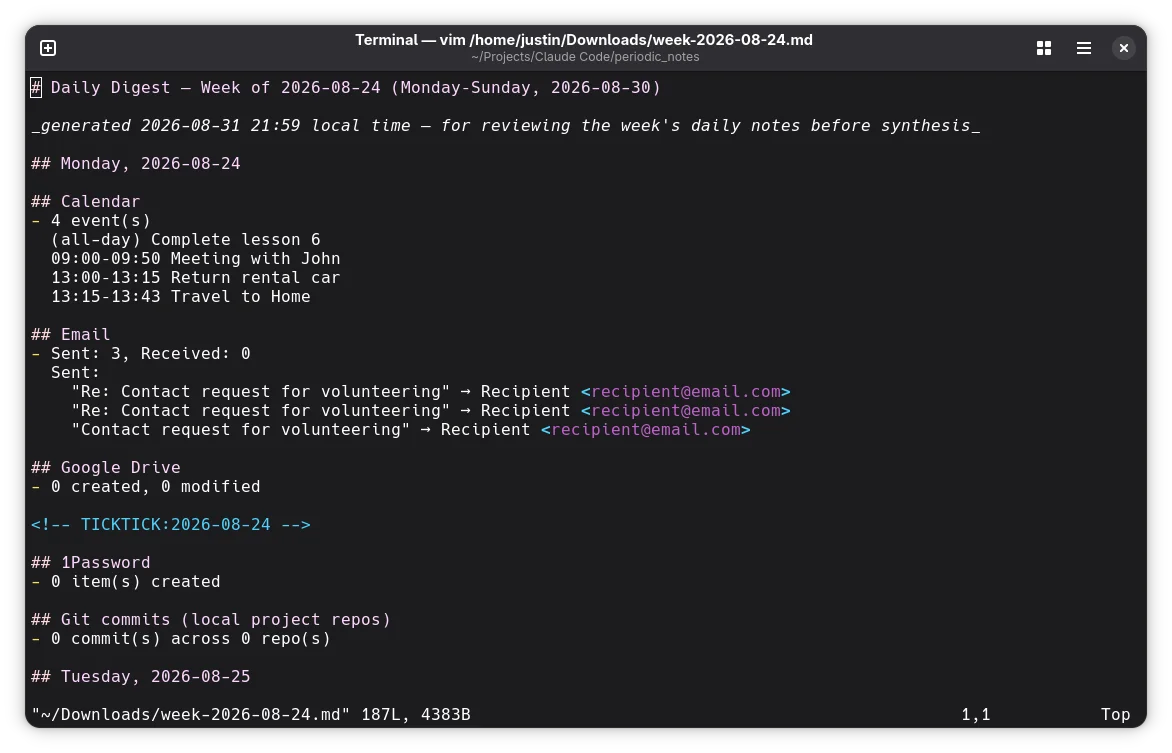
Writing my daily notes in my note taking app, Obsidian, means remembering what actually happened that day. Taking which meetings I had, what emails mattered, which projects I touched, what I finished and reconstructing that from memory at the end of the day is unreliable, and I didn’t want an LLM writing the note itself; I wanted the raw material to write it from. daily_digest is a standalone Python script, plus an optional /daily-digest Claude Code skill, that gathers that material and hands it back as a scannable digest. It never writes prose and never touches the Obsidian vault.
What it does
The script pulls from five sources: Google Calendar, Gmail, Google Drive, 1Password, and git commits across local project repos and outputs a digest for a single day or a whole --week:
python3 daily_digest.py                # yesterday (default)
python3 daily_digest.py today
python3 daily_digest.py 2026-06-08     # a specific day
python3 daily_digest.py --week         # the week containing yesterday
The Claude Code skill wraps that same script as a subprocess and merges in one more source the script itself doesn’t touch: a TickTick “completed tasks” section, via TickTick’s own MCP server. Output is printed in the chat response and also saved to ~/.local/state/daily-digest/ — a location deliberately outside any git-tracked path, since the digest contains real personal signal (email subjects, senders, calendar titles).
Why it’s built this way
A script Claude Code only ever runs as a subprocess, never a connector. Google Calendar/Gmail/Drive access goes through my own Google Cloud OAuth client, with credentials.json/token.json stored only in the script’s directory. Claude Code never sees them because the skill’s allowed-tools has no Google-scoped tool at all, only permission to run the script and read/write the digest files. That’s the same arm’s-length relationship the sibling periodic_notes project has with the claude CLI, just inverted: there, Claude is the thing kept away from the vault; here, Claude is kept away from the Google account.
Scoped so narrowly that the API itself enforces the privacy, not just the script. The Gmail scope is gmail.metadata, not gmail.readonly — under that scope, the Gmail API flat-out refuses format=full/raw requests, so email bodies are never fetched, not just never displayed. Drive is drive.metadata.readonly, so file content is never fetched either. “Never show email bodies or file content” is a guarantee Google’s API enforces, not a promise the script’s own code has to keep.
Every source fetches once per range, then buckets by day. Each gather_X_range(start, end) function pulls its source across the whole range in one pass and sorts the results into dict[date, Section] afterward — a single day is just that range function called with a one-day span. This matters most for Gmail: naive day-by-day scanning would re-walk the same messages seven times over a week, and under gmail.metadata there’s no q search parameter to filter by date directly, so the script instead pages through messages.list() filtered by label and stops once a message’s internalDate falls before the range. One side effect: “Received” only counts mail still labeled INBOX — anything auto-archived or filtered out on arrival goes uncounted. That’s an accepted trade-off for keeping the narrower scope, not a bug.
Any source can fail without taking down the run. Calendar, Gmail, Drive, 1Password, and the repo scan are each wrapped so a failure, not authorized yet, op not signed in, an API error — renders as skipped: <reason> in that one section instead of aborting the whole digest.
A gotcha worth knowing
Date parsing has to regex-validate before calling strptime, not after: a bare datetime.strptime(arg, "%Y-%m-%d") will silently accept an unpadded date like 2026-8-30 and parse it anyway. resolve_target_date rejects that shape with a regex first, so 2026-8-30 is an error rather than a quietly-accepted 2026-08-30. This is the same gotcha already documented in the sibling periodic_notes project — if a date validator looks unusual, it’s worth actually confirming what it rejects rather than assuming the obviously-malformed cases are the only ones that matter.
Try it yourself
You’ll need Python 3.10+ and a Google Cloud project with the Calendar, Gmail, and Drive APIs enabled for the OAuth setup; 1Password integration is optional and just reports skipped if you don’t have the CLI installed. The /daily-digest skill additionally needs a DAILY_DIGEST_HOME environment variable pointing at your clone, and a TickTick MCP server if you want that section filled in rather than skipped. Full setup, scopes, and known gotchas are in the README.


Related
Thanks for reading. Questions or corrections are welcome at
jlmc.space@gmail.com. If this was helpful and you'd like to support the site, a coffee is always appreciated.