Configure a task manager to get things done
Last modified: Created:
Overview
- I’m using a task manager called TickTick, but this guide should be applicable to most task managers like Todoist, Any Do, and Things. They could probably work for default apps like Apple Reminders and Google Tasks, but I haven’t tried them.
- The way I was using task manager had been leading to cognitive overload. I was organizing my tasks by list instead of by decision-making views. That meant that I didn’t have any meaningful view to help me decide what task needed my attention most. I redesigned my workflow and layed it out here.
- I use kanban views in my lists to let me know the status of my tasks (Not started, In Progress, Pending and Done)
The real issues with my previous setup
- Lists are hiding work If something matters now, it should not be buried in a thematic list.
- “In Progress” across multiple lists is a trap Kanban only works if WIP is globally visible. Otherwise I think I’m focused while actually juggling 10 things.
- My brain was doing the prioritization work A task manager should remove that load, not demand a daily scavenger hunt.
New workflow
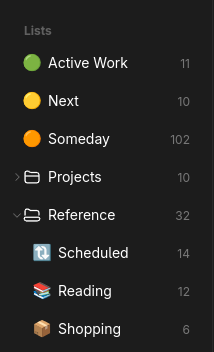
- Keep reference lists
- Scheduled
- Reading
- Shopping
- Make an Active Work list as the primary Kanban board
- There should only be a maximum of three items in here any any point. This is the list where I live day-to-day
- Make a Next or Someday list to act as a parking lot. This will house items that I will do, but not now. This will just be a list, not a Kanban. Think of this as committed but inactive
- Think of other reference lists
- Admin / Life Stuff
- This setup allows me to see all active work in one place. I stop losing items in random lists and I no longer need to prioritize in my head
Daily triage (5-10 min)
- Is this time-specific?
- Add a date reminder > Move to Scheduled
- Is this reference?
- Move to Shopping or Reading
- Move to Next if you answer yes to any of the following
- Would future-me be pissed if this isn’t done in the next 2–4 weeks?
- Is there an external consequence if I ignore this?
- Do I already know the first physical step?
- If I had a free afternoon this week, would I actually choose this?
Starting work
Before moving anything into In Progress - Are there already three items there? - Yes > Finish or pause one first - No > Proceed
Weekly ritual (10 minutes, max)
Once a week:
- Open Next
- Promote 1–3 items into Active Work if capacity allows
- Open Someday
- Promote at most 1–2 items to Next
- Delete or rewrite anything that feels stale That’s how this system stays alive.
jlmc.space@gmail.com or consider buying me a coffee.